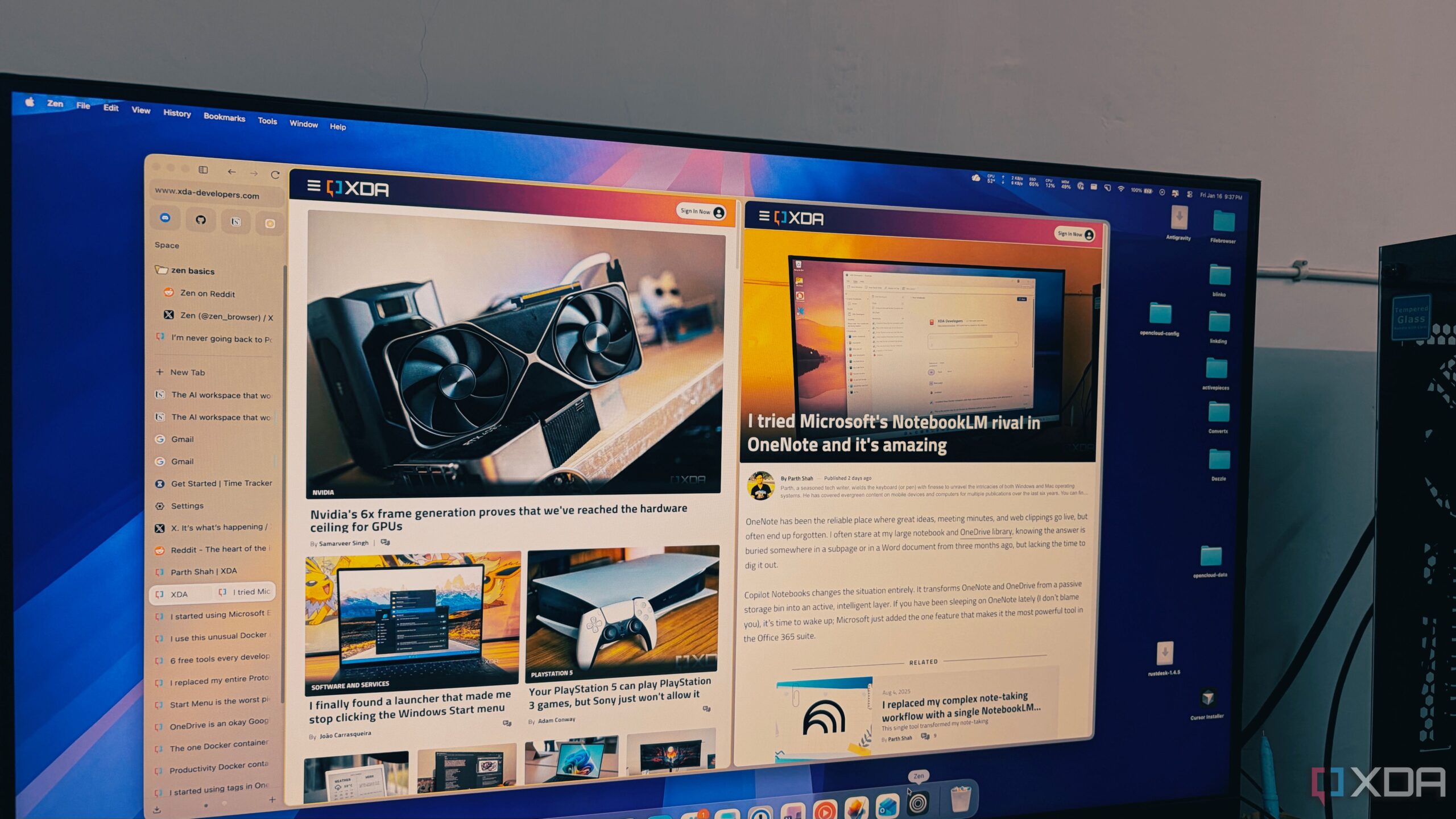
The launch of the Zen Browser has the potential to transform the way users manage their online research. Designed on the foundation of Firefox, this innovative browser addresses common frustrations associated with traditional tab management found in browsers like Chrome and Edge. It offers a solution for users who often find themselves overwhelmed by numerous open tabs, particularly those exceeding fifty.
Unlike many modern browsers that rely on Google’s Chromium, Zen Browser embraces a minimalist approach that prioritizes user experience and productivity. The vertical tab management system provides a fresh perspective, allowing users to navigate through their research seamlessly. This unique design is particularly beneficial for those who frequently juggle multiple projects or tasks online.
Revolutionary Tab Management Features
The standout feature of Zen Browser is its vertical tab layout, which fundamentally changes how users interact with their tabs. Traditional horizontal tab strips can become cluttered and unwieldy, especially when more than fifty tabs are open. In contrast, Zen’s vertical orientation allows for a clear view of each tab’s full title, minimizing the need for users to recall where they saved specific research pages.
This design not only enhances readability but also helps maintain a sense of organization. The sidebar, which houses the tabs, can be set to auto-hide, providing an unobstructed view of web content. When needed, it smoothly reappears with a fluid motion, ensuring users can focus on their tasks without distraction.
Another notable feature is the Essentials section, which allows users to pin important applications such as WhatsApp, Gmail, and Telegram at the top of the sidebar. Unlike standard pinned tabs, these applications remain visible and accessible without shrinking, creating a permanent dock for essential tools.
Furthermore, Zen Browser introduces Workspaces that enable users to separate different areas of their online life. For instance, a user can create distinct workspaces for writing, personal projects, or financial management, thereby preventing information overload and enhancing productivity.
Privacy and Performance Advantages
One of the critical aspects of Zen Browser is its emphasis on privacy and performance. Utilizing Firefox’s container technology, users can maintain multiple accounts across various platforms, such as Google, without the risk of cross-contamination of data. Each container is color-coded for easy identification, streamlining the browsing experience further.
Performance-wise, Zen Browser stands out due to its efficient handling of background processes. While other browsers like Brave and Chrome tend to slow down significantly with an increasing number of tabs, Zen maintains a snappy performance thanks to the Gecko engine. Users report that even with over one hundred tabs open, the browser remains responsive, allowing for a smoother workflow.
This performance is particularly appealing for heavy users who require a reliable and efficient browsing experience. By not treating excessive tab usage as a flaw, Zen Browser accommodates the needs of its users, making it a compelling choice for anyone looking to enhance their productivity online.
In an increasingly digital landscape, the Zen Browser represents a significant advancement in browser technology. Its combination of minimalist design, innovative tab management, and robust privacy features positions it as a serious contender against established players like Chrome and Edge. As more users seek streamlined solutions for their online activities, Zen Browser may become the go-to option for managing extensive research sessions effectively.